BioreactAR
An AR passthrough learning tool for Meta Quest 3 that places a full-scale industrial 30L bioreactor in a classroom, where students select each part to read what it does.
- Role
- Primary Unity developer
- With
- Faculty and graduate developers from NC State, Purdue and Drexel
- When
- June 2024
- Built with
- Unity 6 · URP · Meta XR SDK · Quest 3 · Maya · Python
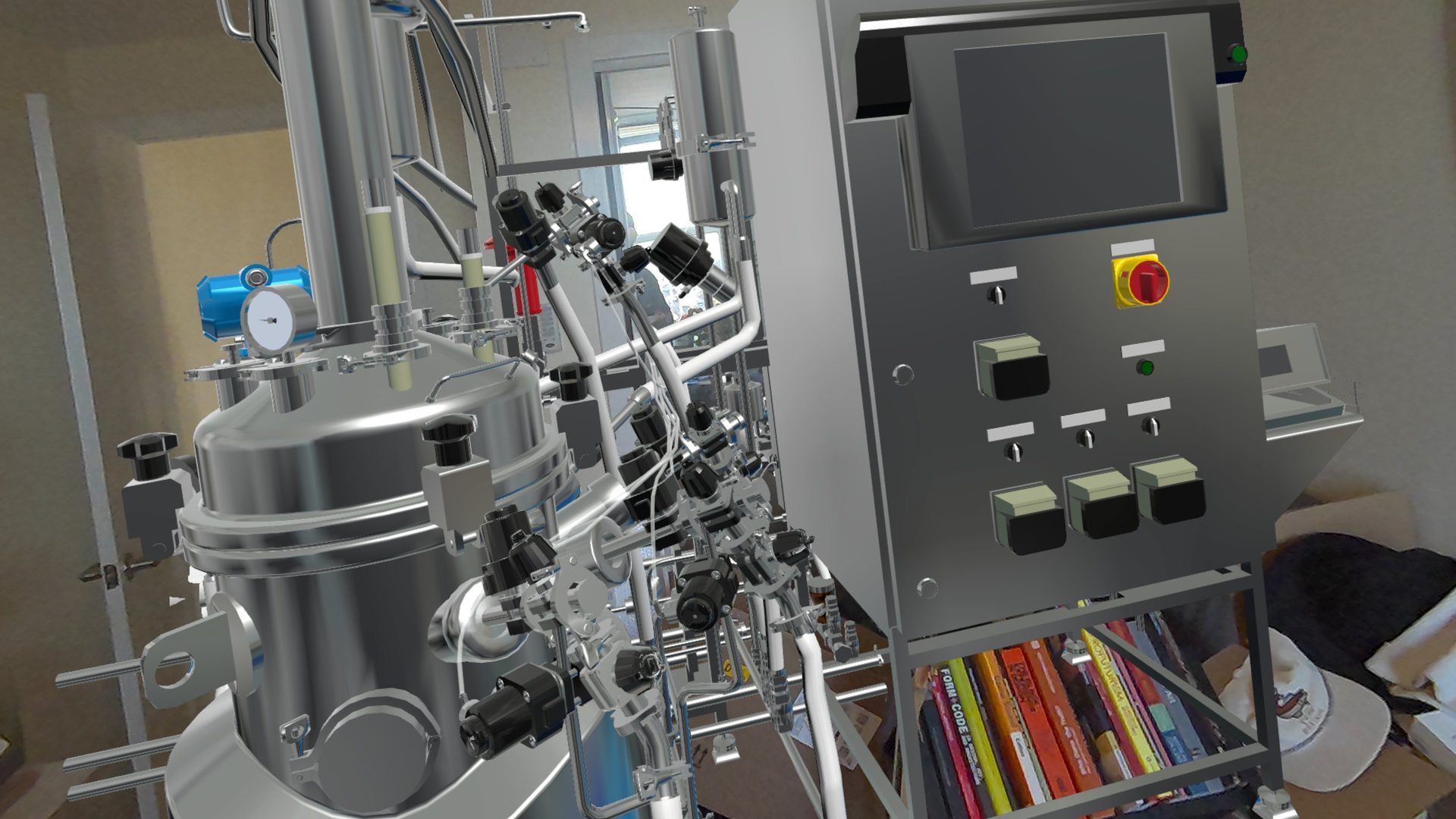
BioreactAR puts a full-scale, 30-liter industrial bioreactor in a classroom. Through Meta Quest 3 passthrough, students walk around the vessel, select a component, and read what that part does, with the explanation anchored to the part itself. At full scale a student sees how large the equipment is and how its parts relate in space, which a diagram flattens.
The bioreactor model began as part of a VR training simulation at NC State. Faculty who built that simulation, now at Purdue and Drexel, regrouped to rebuild it as an AR tool for classroom teaching, with graduate developers from both universities. As a Drexel graduate student I was the primary developer of the Unity build. When my part ended, I handed the project to the Purdue team, who continue its development.
Stack: Unity 6, Universal Render Pipeline, Meta XR SDK and Building Blocks, spatial anchors, Quest 3 passthrough, Maya.
Rebuilding the model
The inherited Maya model was in poor shape for real-time use. Repeated duplication had left copies of the same materials and shaders scattered across its parts, and the hierarchy had no structure a developer could work with.
So I wrote a Maya Python script to do the cleanup. It parsed the model, found parts that shared a material, combined them, and reorganized the hierarchy into nested groups by material properties. With the structure clean, I recreated every material from scratch in URP.
Placement and interface
Spatial anchors from the Meta XR Building Blocks fix the bioreactor to the physical space, and the same Unity framework supplies the rest of the XR stack. For the interface, I combined Meta’s XR UI Building Blocks with world-space Unity Canvas settings configured for XR.
The biggest win was a data decision. Each bioreactor part has its own ScriptableObject with that part’s information, and one shared set of UI components reads whichever asset matches the selected part. Teammates could write and correct content for any part without opening a scene or touching interface code.
Problems
Occlusion gave me the most trouble. With scene occlusion on, real objects in front of the bioreactor hid it correctly, and the model looked placed in the space. The cost was a dithering flicker along every occluded edge. In the end the flicker did more damage to the illusion than occlusion repaired, and we removed it.
Networking was the second problem. The tool had to support a PC managing the session with headsets joining as users, and as primary developer I had a single headset to test on. To exercise both roles at once, I used a plugin that duplicates the Unity project into a second editor instance and wrote a local communication manager. On my desk, the PC acted as session manager while my headset joined as a user.
Video
BioreactAR: Development Build